
Purview Data Governance is retiring — keep your glossary working
Microsoft ends support for Purview Data Governance on November 12, 2027. Bring your glossary terms, data products and owners into offdataai, live from your tenant or from a CSV export, and turn them into definitions AI agents use to answer questions.
- From $1/month
- 8 SQL targets
- 174 templates
1source Purview Unified Catalog (read-only)2read 412 terms · 18 products · 96 CDEs34domains → owning teams5 Finance 138 terms owner finance-data@6 Sales 97 terms owner sales-ops@7 Supply 121 terms steward supply-team@89proposals 401 concepts · 18 data products10skipped 11 expired terms11flagged 29 drafts to review12conflict "Active Customer" Sales ≠ Finance1314nothing changed yet · review, then release
Twelve months to move what your teams wrote down
Nov 12, 2026
Retirement announced
Purview narrows to data security and compliance. Governance moves to Fabric's OneLake catalog.
Now – mid 2027
Your window to move
Inventory terms and owners, settle conflicting definitions, and bring the glossary into its new home.
Nov 12, 2027
Support ends
Microsoft ends support for Purview Data Governance.
“Support for Purview Data Governance will end Nov. 12, 2027.” Purview stays focused on data security and compliance; the OneLake catalog in Microsoft Fabric becomes the foundation for governance.
Your glossary, mapped one to one
A scanner can rediscover your tables. It can't rediscover what your teams decided those tables mean, or who is accountable for each definition. That is what the import keeps.
| In Microsoft Purview | In offdataai |
|---|---|
| Glossary term | A concept in your ontology, with its definition, acronyms and synonyms |
| Governance domain | The team that owns the definition, kept per team so Sales and Finance can differ |
| Owner, expert, steward | Owner name and email on the definition, with Purview recorded as the source |
| Related terms, parent, resources | Kept as evidence on the concept, with links preserved |
| Data product | A concept whose fields are its critical data elements, with its business use |
| Critical data element | A typed field on the data product it belongs to |
| Draft / Published / Expired | Drafts flagged for review, published terms proposed, expired terms skipped |
Connect, review, serve to agents
- 01
Connect or upload
Connect your Purview tenant with an Entra app registration (read-only, metadata only), or upload the glossary CSV Purview exports. Unified Catalog and the classic data map both work.
- 02
Preview, then review
See every term, data product and team definition before anything is saved. Everything arrives as a proposal; nothing already in the ontology is overwritten.
- 03
Bind and serve
Bind concepts to real tables in Databricks, Snowflake, BigQuery or Postgres, rule on conflicting definitions, release a version, and serve it to AI agents over MCP.
The CSV import is included from the Starter plan; the live Purview connection is part of Pro. See plans
From a reference glossary to answers agents can trust
Definitions per team
Finance and Sales each keep their meaning of a term, and a ruling records which one agents use.
Released, not drifting
The ontology is versioned with draft and release, with an audit log of who changed what.
Answers, not just entries
Agents ask in business terms and get SQL built from your definitions and join paths, under row filters and PII masking.
No lock-in, ever again
Export Apache Ossie, OWL, JSON-LD, dbt MetricFlow YAML, Snowflake semantic views or Databricks metric views.
The OneLake catalog for access and protection. offdataai for what the data means.
You don't have to choose. Fabric's OneLake catalog covers discovery, permissions and sensitivity labels in the Microsoft estate, and Purview keeps protecting sensitive data. offdataai holds the business meaning your glossary captured, ties it to the tables in any warehouse you use, and serves it to AI agents. Keep your Purview CSV export as a record either way.
Read Microsoft's announcement
A next step in the evolution of the Microsoft Data Governance strategy
Microsoft Security Community Blog · November 12, 2026
OneLake catalog: the trusted catalog for organizations worldwide
Microsoft Fabric Updates Blog
Microsoft Fabric roadmap
roadmap.fabric.microsoft.com
Get started with Microsoft Fabric
microsoft.com
The full write-up: Microsoft Purview Data Governance is retiring. What happens to your business glossary?
See it in action
A narrated walkthrough, recorded in the real app.
Three steps, minutes not months
Describe or import
Answer a short interview, open a template, draw on the canvas or connect a live database.
Review a validated model
Keys, grain, history and PII are checked before any code is written. Refine it in plain English.
Ship and keep it current
Native DDL, dbt, seeds, docs and an ontology. Push to Git, diff versions, generate migrations.
Why teams choose offdataai
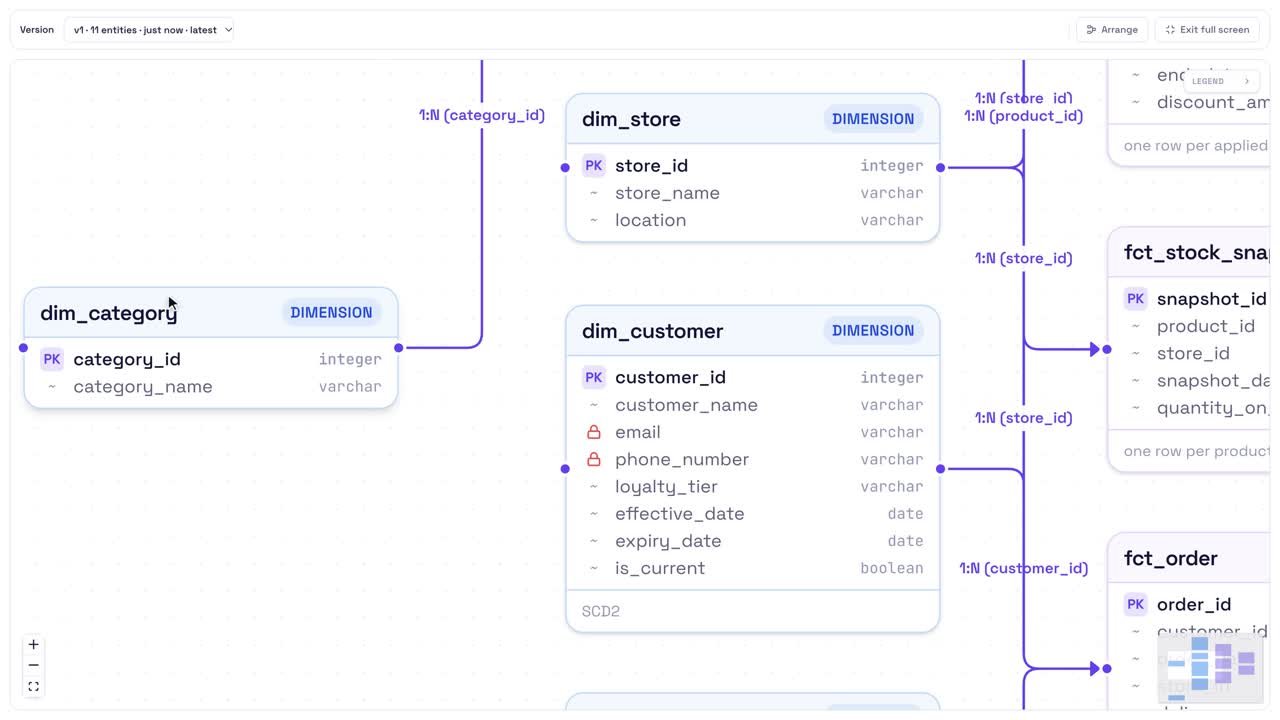
A validated ERD: keys, SCD2 history and PII flags on every table
- 01
Your business glossary is the part of Purview that is hardest to rebuild.
- 02
Tables can be rescanned; the meaning your teams agreed on, and who owns it, cannot.
- 03
offdataai imports that meaning as reviewable proposals, keeps each domain's definitions with the team that owns them, binds them to the tables in your warehouse, and serves them to AI agents with access rules applied.
What you get with the import
Live or CSV
Read the Unified Catalog or classic data map directly, or upload Purview's glossary export.
Owners kept
Governance domains become owning teams, with owner and steward names and emails.
Data products intact
Each data product keeps its critical data elements as typed fields.
Review before release
Preview first; everything lands as a proposal and nothing existing is overwritten.
Ready for agents
Serve definitions over MCP with row filters, PII masking and a log of every query.
0
Validated templates
0
SQL targets
0
Modeling paradigms
0+
Industries covered
Generates native SQL and dbt for 8 platforms · connects live to Snowflake, Databricks, BigQuery, Redshift and Postgres
 RedshiftPostgreSQL
 Synapse
 FabricDuckDB
 dbtSnowflakeBigQueryDatabricksRedshiftPostgreSQLSynapseFabricDuckDBdbt
Frequently asked questions
When does Microsoft Purview Data Governance support end?
What does offdataai import from Purview?
Live connection or CSV: which should we use?
Will the import overwrite anything?
Do we have to stop using Microsoft Fabric?
Can we leave offdataai later?
Related
- Context layer for AI agentsConcepts, metrics and join paths for agents over MCP.
- Ontology builderConcepts, relations, metrics and team definitions, versioned.
- Semantic layerGoverned metrics compiled into correct SQL.
- Data catalogConnected sources with impact analysis.
- Atlan vs offdataaiA catalog for what exists, offdataai for what it means.
- Microsoft FabricGenerate Fabric Warehouse DDL and dbt.
Part of the offdataai platform
The business context behind accurate AI answers, built from the data model up.
- 01DesignLogical, physical and dimensional models.
- 02GenerateSQL, dbt, documentation and migrations.
- 03DefineBusiness metrics, semantic models and ontology.
- 04ConnectReal warehouse schemas and metadata.
- 05GovernDrift, impact analysis, tests and approvals.
- 06ActivateMake trusted context available to AI agents.
This page covers Generate and Connect. Every stage works on the same model, so what you design here carries through to the rest.
Give your AI agents context they can trust.
Design the model, define what your metrics mean, and serve that context to every agent and BI tool, on the warehouse you already run.
Microsoft, Microsoft Purview and Microsoft Fabric are trademarks of the Microsoft group of companies. offdataai is not affiliated with or endorsed by Microsoft. Dates and statements about Microsoft products come from Microsoft's public announcement of November 12, 2026; confirm details for your tenant with your Microsoft account team.