
Give your AI agents the meaning behind your data
Connect Claude or any MCP client to offdataai. Agents get your approved concepts, metric definitions and join paths, ask your ontology questions in plain English, and run read-only SQL against your databases, all under scoped API keys.
- From $1/month
- 8 SQL targets
- 174 templates
tools/list
See it in action
A narrated walkthrough, recorded in the real app.
Three steps, minutes not months
Describe or import
Answer a short interview, open a template, draw on the canvas or connect a live database.
Review a validated model
Keys, grain, history and PII are checked before any code is written. Refine it in plain English.
Ship and keep it current
Native DDL, dbt, seeds, docs and an ontology. Push to Git, diff versions, generate migrations.
Why teams choose offdataai
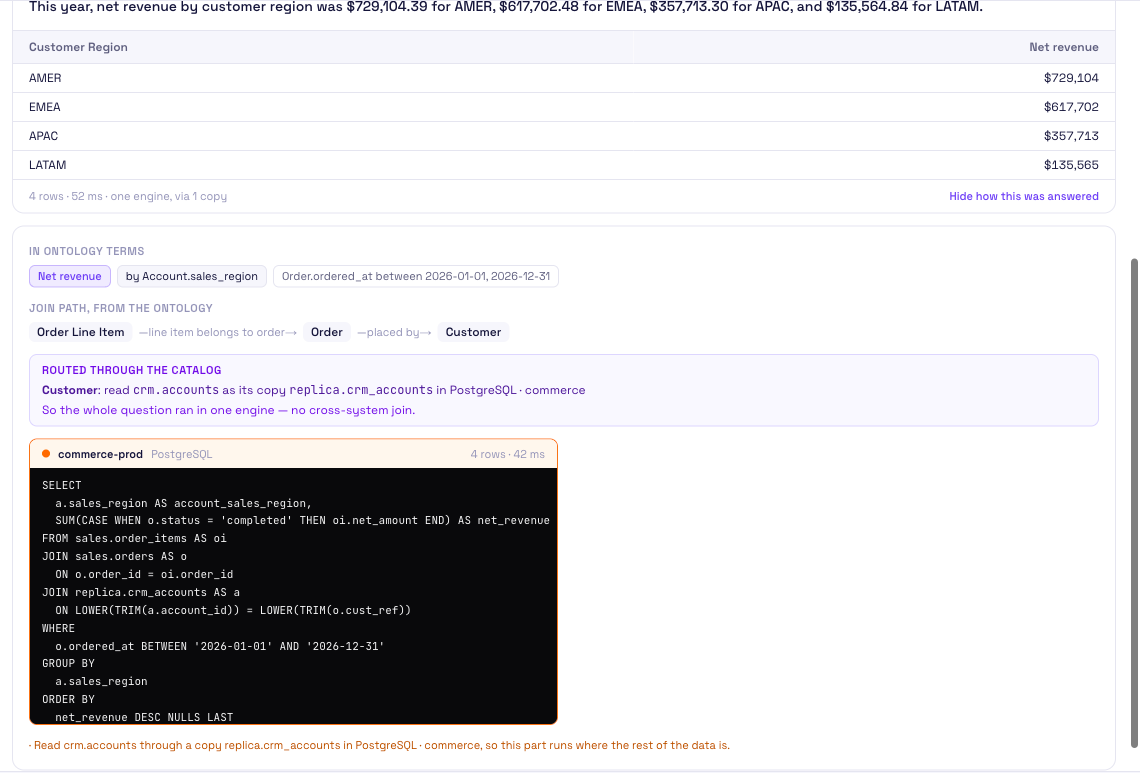
A plain-English question answered with the join path and the SQL that ran
- 01
AI agents are good at writing SQL and bad at knowing your business.
- 02
Point one at a warehouse and it has to guess which of three revenue columns is the right one and how five tables join.
- 03
The answers already exist in your data model and ontology; the MCP server hands them to the agent.
- 04
The simplest path is
ask_ontology: the agent passes the question in words, offdataai plans it from your ontology's metrics and fields, runs it under the same access rules and masking as any other question, and returns a one-sentence answer with the query, the SQL that ran and the rows. - 05
An agent that prefers to write SQL calls
get_query_contextfor the concepts, the metric's definition and the resolved join path, then runs a read-only query throughrun_query. - 06
When it finds a gap, it can propose a new concept, which waits for a person to approve.
The code it writes, not a sketch
This is the shape of what offdataai generates here, straight from the validated model. Copy it, download it, or push it to Git.
- Get the query context for a question
- Ask in plain English
- Search and browse the ontology
1→ tools/call ask_ontology2 { "ontology_id": "…",3 "question": "revenue by customer segment" }45← Answer: Enterprise is the largest segment by revenue.6 -- planned as {"metrics": ["revenue"],7 "dimensions": ["Customer.segment"]}8 -- ran on warehouse (snowflake), 3 row(s)9 SELECT …10 Customer segment | Revenue11 …1213# Or step by step, writing the SQL yourself:14→ tools/call get_query_context15 { "question": "revenue by customer segment" }16← concepts, metric definition, tables, join path1718→ tools/call run_query19 { "connection_id": "…", "sql": "SELECT …",20 "max_rows": 200 }
What agents can do
Get the query context for a question
get_query_context returns the concepts, metric definitions, tables and resolved join path for a natural-language question in one call.
Ask in plain English
ask_ontology takes a question in words, plans it from your ontology's metrics and fields (never free SQL) and answers it under the same access rules, row filters and personal-data masking as any other agent question. One AI credit per question.
Search and browse the ontology
search_concepts, get_concept, get_ontology and join_path let an agent explore your business vocabulary and how concepts connect.
Run read-only SQL safely
run_query allows one SELECT or WITH statement, in a read-only transaction with a timeout and a row cap. Writes and stacked statements are refused.
Suggest, never overwrite
propose_concept and propose_relation put an agent's ideas in the review queue. Your ontology only changes when a person accepts them.
Scoped API keys
Grant ontology:read, ontology:write, ontology:query, query:read or pii:read per key. Database access and unmasked personal data are opt-in, and every query attempt is recorded.
Built on your real model
The context comes from the same model that generates your DDL and dbt project, so what the agent reads matches what is deployed.
0
Validated templates
0
SQL targets
0
Modeling paradigms
0+
Industries covered
Generates native SQL and dbt for 8 platforms · connects live to Snowflake, Databricks, BigQuery, Redshift and Postgres
 RedshiftPostgreSQL
 Synapse
 FabricDuckDB
 dbtSnowflakeBigQueryDatabricksRedshiftPostgreSQLSynapseFabricDuckDBdbt
Frequently asked questions
What is an MCP server?
Why do AI agents need an ontology to query a warehouse?
Which tools does the offdataai MCP server provide?
Can an agent change my data or my ontology?
How is access controlled?
Which plan includes the MCP server?
Which AI clients work with it?
Explore offdataai
- AI Data ArchitectHire Atlas by the hour: voice or text, 43 languages, read-only.
- Semantic layerGoverned metrics, compiled to SQL for people and AI agents.
- Context layer for AI agentsConcepts, metrics, join paths and docs for agents over MCP.
- Data catalogEvery table and column, which concepts use it, where it's copied.
- Data modeling tools comparedDesktop, diagram, code-first and AI-native tools side by side.
- Ontology builderTurn a data model into a published business ontology.
Part of the offdataai platform
The business context behind accurate AI answers, built from the data model up.
- 01DesignLogical, physical and dimensional models.
- 02GenerateSQL, dbt, documentation and migrations.
- 03DefineBusiness metrics, semantic models and ontology.
- 04ConnectReal warehouse schemas and metadata.
- 05GovernDrift, impact analysis, tests and approvals.
- 06ActivateMake trusted context available to AI agents.
This page covers Activate. Every stage works on the same model, so what you design here carries through to the rest.
Give your AI agents context they can trust.
Design the model, define what your metrics mean, and serve that context to every agent and BI tool, on the warehouse you already run.